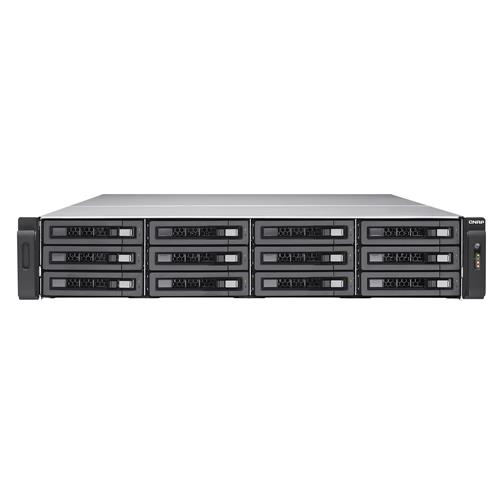
QNAP TES-1885U NAS Rack (2U) Ethernet LAN Black D-1531
Buy from SmartTeck
42 397,38 kr
Overview
QNAP TES-1885U NAS Rack (2U) Intel Xeon D D-1531 Black
Powered by an Intel Xeon D processor the powerful enterprise-class TES-1885U is open for two operating systems either the FreeBSD-based QES or Linux-based QTS. While QES supports ZFS for the utmost reliability and allows near-limitless snapshots block-level data deduplication and real-time data compression QTS features Qtier Technology SSD cache and an abundance of value-added apps to realize storage efficiency and diverse usage applications. The TES-1885U gives the flexibility to choose from two operating systems enabling businesses to deploy proper operating systems on multiple TES-1885U based on their needs and goals in different stages.N/AN/AIntel Xeon D processor optimizes performance and efficiencyN/AN/APowered by an advanced 14nm Intel Xeon D-1531 6-core 2.2GHz 64-bit SoC processor with an integrated PCH up to 128GB DDR4 ECC RDIMM RAM / 64GB DDR4 non-ECC UDIMM RAM and with two built-in 10GbE SFP+ ports the 12Gb/s SAS-enabled TES-1885U delivers outstanding performance for data transmission and applications. With a thermal design power of only 20-65W the TES-1885U fulfills demands for both performance and energy saving.N/AN/AExcellent hardware: immensely durable & compactN/AN/AThe TES-1885U supports SAS 12Gb/s 3.5/2.5 drives allowing for SAS 12Gb/s and SATA 6Gb/s hard drives and SSDs. Businesses can create the most cost-effective storage by implementing suitable drives based on their needs.N/AN/A1. Intel Xeon D multi-core processorN/A14nm energy-efficient SoC supports DDR4 RAM and PCIe Gen.3 per-lane throughput.N/AN/A2. DDR4 2133 MHz memoryN/ASupports four DDR4 RAM modules for UDIMM and ECC RDIMM (up to 64GB UDIMM RAM up to 128GB RDIMM RAM).N/AN/A3. 12Gb/s SAS controllersN/ASupports 12Gb/s SAS hard drives and SSDs for fast data transfer and highly-reliable storage.N/AN/A4. Hot swappable fansN/AFour hot-swappable 6cm cooling fans that can be quickly and easily replaced.N/AN/A5. 2 x Built-in 10GbE SFP+ portsN/ABoosts iSCSI/NFS/CIFS network transfer for virtualization applications data backup/restoration and massive data transmission.N/AN/A6. 4 x Gigabit portsN/AIdeal for service binding port trunking and MPIO configurations.N/AN/A7. 4 x PCIe slotsN/AThree high-speed PCIe Gen.3 and one PCIe Gen.2; supports 10GbE/ 40GbE adapters and PCIe NVMe SSD.N/AN/A8. 6 x 2.5 SATA SSD slotsN/AUsed for caching high-performance storage pools or the QES OS drive.N/AN/A5-year warranty: Global warranty inclusiveN/AN/AThe TES-1885U is backed by a 5-year warranty with 3-year global warranty inclusive at no extra cost. This premier warranty demonstrates QNAPs dedication to the essential business needs of continuous operations and non-interrupted services to their users.N/AN/ADual OS options system inside a single rackmount NASN/AN/AThe TES-1885U provides flexibility for choosing between uncompromising reliability and greater versatility. The QES operating system is suited for enterprise-level storage with maximized business continuity or the QTS operating system for enjoying application storage for greater functionality.N/AN/AQES operating system based on FreeBSD & ZFSN/AN/AThe TES-1885U supports the brand-new QES (QNAP Enterprise Storage) operating system which is based on the simple and efficient FreeBSD kernel and the ZFS file system that has been proven through years of experience to be most suitable for high-end enterprise applications. Continuing the same user experience with the QTS operating system QES provides business users with an easy learning curve to quickly deploy the TES-1885U and provides the best storage solution jointly with the current QNAP NAS.N/AN/AZFS the best file system for business data storageN/AN/AThe TES-1885U features ZFS a combined file system and logical volume manager to support various advanced functions for high-end enterprise storage including powerful storage expansion flexible storage pools RAID-Z for data protection simplified management high-performance SSD cache nearly limitless snapshots and cloning data deduplication in-line compression self-healing and thin provisioning with reclaim for optimized utilization for virtual machine storage. ZFS is designed with a focus on data integrity and uses its end-to-end checksums to detect and correct silent data corruption caused by hardware defects bugs in firmware or metadata errors effectively protecting users data.N/AN/ADeduplication and compression to maximize VDI storage performanceN/AN/AAll-flash storage featuring high-performance random I/O is advantageous for databases online transaction processing (OLTP) and virtual desktop infrastructure (VDI) applications. Though the cost of all-flash storage is higher than using normal hard drives data deduplication and compression technology can greatly assist in storing more data in less storage space with greater cost-efficiency and performance gains. Using VDI for example there could be over 90% duplicate data from OS images and applications that are spread over virtual desktops. The TES-1885U supports block-based data deduplication to optimize storage usage from redundant data. Deduplicated virtual desktops become easier to be cached to achieve optimal virtual desktop performance. In-line data compression helps shrink data size further optimizing storage usage. For mastering storage in a virtualized environment the TES-1885U provides businesses with the most cost-effective remote virtual desktop platform and mission-critical information warehousing.N/AN/AStrong disaster recovery made by nearly limitless snapshots and SnapSyncN/AN/AThe TES-1885U supports up to 65536 snapshots for iSCSI LUN and shared folders. When executing a remote snapshot backup it only needs to transfer changed data and can use deduplication and compression to significantly reduce the amount of transferred data. The TES-1885U can provide remote backup SnapSync for snapshots at the shortest interval of every five minutes fully supports VMware vCenter Site Recovery (SRM) technology provides Storage Replication Adapter (SRA) for SRM and provides enterprise-class remote backup & disaster recovery solution to fulfill business continuity.N/AN/AWell-rounded backup solutions to secure dataN/AN/AQNAP NetBak Replicator is easy-to-use and VSS-aware backup software and helps businesses to create complete backups in datacenter and virtualization environments without needing to purchase expensive and complex commercial software. To build a QNAP Snap Agent and VSS Hardware Provider operating environment all applications (including VSS Service Requestor Provider and QNAP Snap Agent) can be deployed with VSS-Aware applications on the same server and the minimal requirements are only one TES-1885U and one server for it to be operational.N/AN/AStorage for comprehensive virtualization applicationsN/AN/AThe TES-1885U supports VMware vSphere 6.0 and Citrix XenServer 6.0 and is compatible with Microsoft Hyper-V benefiting flexible deployment and management in virtualization environments. The TES-1885U supports VMware VAAI and Microsoft ODX to increase performance by offloading server loading for ESXi server and Hyper-V respectively and supports QNAP vSphere Client plug-in Web plug-in and QNAP SMI-S provider with enhanced efficiency of operations and management in virtualization applications.N/AN/AIdeal backup NAS for Enterprise ZFS NASN/AN/AWhen running the QES operating system the TES-1885U is the perfect backup storage for the dual-controller Enterprise ZFS NAS using SnapSync. If the Enterprise ZFS NAS unexpectedly stops the TES-1885U can immediately recover all the backed up data locally to take over operations and services with maximized uptime. It prevents the downtime required to restore data from a remote QTS NAS/rsync server back to the recovered Enterprise ZFS NAS making the TES-1885U the best option to pair with the Enterprise ZFS NAS as a backup NAS to achieve optimal recovery time objectives.N/AN/AThe QTS operating system not only supports storage optimization with Qtier for driving auto-tiering block-based snapshot and SSD read/write cache but also provides rich business-ready applications and functionality providing a comprehensive all-in-one NAS solution.N/AN/ATiered storage and application-based partitioningN/AN/AQNAP's Qtier Technology empowers the TES-1885U with Auto Tiering that helps continuously optimize storage efficiency across SSDs and SAS/SATA drives. With Auto Tiering the TES-1885U can automatically move frequently-used "hot" data to high-performance storage tiers and less-accessed "cold" data to lower-cost higher-capacity drives making the TES-1885U an extremely efficient shared resource. SSDs and SAS/SATA drives can also be configured as independent partitions for different applications ensuring a sufficient throughput level for every application.N/AN/ACross-platform file sharing centralized data storageN/AN/AThe TES-1885U supports SMB/CIFS NFS and AFP protocols for file sharing across Windows Mac and Linux/UNIX networks. Data logs and ISO images of CDs and DVDs can be centrally stored on the TES-1885U and protected by an integrated antivirus solution. The Windows AD and LDAP services enable system administrators to configure user permissions by using existing Windows AD server LDAP server or NAS build-in LDAP services. The TES-1885U supports SAMBA v4 and can act as a domain controller for Windows.N/AN/AWell-rounded backup & disaster recovery solutionsN/AN/AThe TES-1885U offers flexible backup solutions for Windows and Mac users Volume/LUN snapshots Snapshot Replica and Clone and disaster recovery solutions including RTRR rsync and cloud storage backup (Amazon Glacier Azure Storage Google Cloud Storage Google Drive Microsoft OneDrive Dropbox Amazon Drive Yandex Disk Box and Amazon S3/OpenStack Swift/WebDAV compatible cloud services) are also included.N/AN/AVolume & LUN snapshot simplifies restorationN/AN/AQTS Storage Manager features an easy-to-use web-based snapshot tool for you to easily back up and restore data on the TES-1885U back to any point of time to prevent losing important data. You can take snapshots for both volumes and LUN (up to 256 snapshots per volume or LUN and maximum 1024 snapshots per NAS) efficiently replicate volume/LUN snapshots to remote servers by only copying the changes made and quickly clone a volume/LUN snapshot as a local volume without interrupting current system operations. You can even set up the system to automatically take a snapshot of the volume before backup via RTRR/rsync even when files are open.N/AN/AStorage for hosting virtual machines and containerized applicationsN/AN/AVirtualization Station allows you to directly host virtual machines (VM) on the TES-1885U and access them via a web browser or VNC. Virtualization Station supports multiple operating systems fast VM creation VM backup & restoration VM import/export snapshot and Device Management for centrally managing VMs. Virtualization Station allows the TES-1885U and VMs to share the same LAN port and high-speed virtual switches greatly increases transfer speeds between VMs as well as between VMs and the data stored on the TES-1885U. The TES-1885U also features Container Station which integrates LXC and Docker lightweight virtualization technologies. You can operate multiple isolated Linux systems on the TES-1885U as well as download apps from the built-in Docker Hub Registry. What's more QNAP provides comprehensive "QIoT Containers" for Container Station as an ideal platform with countless hands-on containerized apps that helps developers easily apply rapidly develop and conveniently deploy IoT applications.N/AN/AMaximize storage utilization across multiple QNAP NAS with Virtual JBODN/AN/ABesides using expansion enclosures there is an additional option to expand NAS storage capacity. QNAP VJBOD (Virtual JBOD) is network-based JBOD allowing you to expand the storage capacity of a QNAP NAS using other QNAP NAS units. You can mount iSCSI LUNs from a QNAP NAS to the TES-1885U as local disks and create virtual storage pools and volumes for operating NAS functionalities such as creating and reverting snapshots indexing multimedia files into the media library and even further creating iSCSI LUNs. With VJBOD you can centrally utilize the storage space from multiple QNAP NAS units and manage it with the interface on the local NAS.N/AN/AQNAP Helpdesk app for direct technical supportN/AN/AThe Helpdesk app allows you to directly send support requests to QNAP engineers and also allows - with your permission - these engineers to remotely access your NAS over a secure 256-bit encrypted connection to fix serious issues. The Helpdesk also consolidates a wealth of useful information including tutorials FAQs online resources and device compatibility lists. Whether you are new to QNAP NAS or an expert user you can easily find helpful advice and information to effectively solve problems.N/AN/AQRM+: Centralized Remote Server Management SolutionN/AN/AQRM+ is QNAPs Centralized Remote Server Management solution designed for IT teams. It provides a web-based solution - accessible from any web browser - to discover map monitor and manage all of the critical computing devices on the network such as servers PCs embedded PCs and thin clients from a single-point. Supporting IPMI 1.5 and 2.0 QRM+ provides remote KVM (Keyboard Video Mouse) for certain IPMI devices and supports tracking every action using KVM recording and playback. With centralized management by QRM+ IT infrastructure and device security is enhanced and troubleshooting & network resource performance analysis is greatly simplified.N/AN/ACross-device file synchronizationN/AN/AQsync provides multiple ways of file synchronization and group file sharing greatly enhancing the flexibility of collaboration. Any file uploaded to the TES-1885U will be made available for all linked devices such as computers laptops or mobile devices. Qsync is especially useful for frequent travelers to manage files and always have the most up-to-date files on different devices. More advanced features include: syncing shared folders or team folders to increase collaboration; centralized configuration that allows for remotely erasing the Qsync folder on a lost device to avoid data breaches and even restoring it after the device is retrieved.N/AN/AComprehensive surveillance solution providing 24/7 securityN/AN/ASurveillance Station is a professional network surveillance Video Management System (VMS) that offers a user-friendly management interface over 3000 compatible IP camera models and expandable IP camera channel licenses. It supports real-time monitoring video & audio recording and playback with a wide range of customizable settings. You can also install the Vmobile app on your iOS or Android devices to manage monitored channels anytime and anywhere to safeguard your office environment or install the Vcam mobile app to turn your device into a network camera to instantly record to your TES-1885U. The TES-1885U includes 8 free IP camera channels and you can expand up to 80 channels by purchasing additional licenses.N/AN/AInstall-on-demand apps to extend NAS functionalityN/AN/AThe TES-1885U has a built-in App Center that provides over 100 apps including tools for backup/sync business content management communications downloading entertainment and much more. You can freely install apps as needed to expand your TES-1885Us functionality.N/AN/ASeamless capacity expansionN/AN/AThe TES-1885U supports efficient capacity expansion by cascading multiple QNAP RAID expansion enclosures to meet the needs of growing business data providing businesses a cost-efficient storage solution for large data archiving and virtualization applications.
Overview
QNAP TES-1885U NAS Rack (2U) Intel Xeon D D-1531 Black
Powered by an Intel Xeon D processor the powerful enterprise-class TES-1885U is open for two operating systems either the FreeBSD-based QES or Linux-based QTS. While QES supports ZFS for the utmost reliability and allows near-limitless snapshots block-level data deduplication and real-time data compression QTS features Qtier Technology SSD cache and an abundance of value-added apps to realize storage efficiency and diverse usage applications. The TES-1885U gives the flexibility to choose from two operating systems enabling businesses to deploy proper operating systems on multiple TES-1885U based on their needs and goals in different stages.N/AN/AIntel Xeon D processor optimizes performance and efficiencyN/AN/APowered by an advanced 14nm Intel Xeon D-1531 6-core 2.2GHz 64-bit SoC processor with an integrated PCH up to 128GB DDR4 ECC RDIMM RAM / 64GB DDR4 non-ECC UDIMM RAM and with two built-in 10GbE SFP+ ports the 12Gb/s SAS-enabled TES-1885U delivers outstanding performance for data transmission and applications. With a thermal design power of only 20-65W the TES-1885U fulfills demands for both performance and energy saving.N/AN/AExcellent hardware: immensely durable & compactN/AN/AThe TES-1885U supports SAS 12Gb/s 3.5/2.5 drives allowing for SAS 12Gb/s and SATA 6Gb/s hard drives and SSDs. Businesses can create the most cost-effective storage by implementing suitable drives based on their needs.N/AN/A1. Intel Xeon D multi-core processorN/A14nm energy-efficient SoC supports DDR4 RAM and PCIe Gen.3 per-lane throughput.N/AN/A2. DDR4 2133 MHz memoryN/ASupports four DDR4 RAM modules for UDIMM and ECC RDIMM (up to 64GB UDIMM RAM up to 128GB RDIMM RAM).N/AN/A3. 12Gb/s SAS controllersN/ASupports 12Gb/s SAS hard drives and SSDs for fast data transfer and highly-reliable storage.N/AN/A4. Hot swappable fansN/AFour hot-swappable 6cm cooling fans that can be quickly and easily replaced.N/AN/A5. 2 x Built-in 10GbE SFP+ portsN/ABoosts iSCSI/NFS/CIFS network transfer for virtualization applications data backup/restoration and massive data transmission.N/AN/A6. 4 x Gigabit portsN/AIdeal for service binding port trunking and MPIO configurations.N/AN/A7. 4 x PCIe slotsN/AThree high-speed PCIe Gen.3 and one PCIe Gen.2; supports 10GbE/ 40GbE adapters and PCIe NVMe SSD.N/AN/A8. 6 x 2.5 SATA SSD slotsN/AUsed for caching high-performance storage pools or the QES OS drive.N/AN/A5-year warranty: Global warranty inclusiveN/AN/AThe TES-1885U is backed by a 5-year warranty with 3-year global warranty inclusive at no extra cost. This premier warranty demonstrates QNAPs dedication to the essential business needs of continuous operations and non-interrupted services to their users.N/AN/ADual OS options system inside a single rackmount NASN/AN/AThe TES-1885U provides flexibility for choosing between uncompromising reliability and greater versatility. The QES operating system is suited for enterprise-level storage with maximized business continuity or the QTS operating system for enjoying application storage for greater functionality.N/AN/AQES operating system based on FreeBSD & ZFSN/AN/AThe TES-1885U supports the brand-new QES (QNAP Enterprise Storage) operating system which is based on the simple and efficient FreeBSD kernel and the ZFS file system that has been proven through years of experience to be most suitable for high-end enterprise applications. Continuing the same user experience with the QTS operating system QES provides business users with an easy learning curve to quickly deploy the TES-1885U and provides the best storage solution jointly with the current QNAP NAS.N/AN/AZFS the best file system for business data storageN/AN/AThe TES-1885U features ZFS a combined file system and logical volume manager to support various advanced functions for high-end enterprise storage including powerful storage expansion flexible storage pools RAID-Z for data protection simplified management high-performance SSD cache nearly limitless snapshots and cloning data deduplication in-line compression self-healing and thin provisioning with reclaim for optimized utilization for virtual machine storage. ZFS is designed with a focus on data integrity and uses its end-to-end checksums to detect and correct silent data corruption caused by hardware defects bugs in firmware or metadata errors effectively protecting users data.N/AN/ADeduplication and compression to maximize VDI storage performanceN/AN/AAll-flash storage featuring high-performance random I/O is advantageous for databases online transaction processing (OLTP) and virtual desktop infrastructure (VDI) applications. Though the cost of all-flash storage is higher than using normal hard drives data deduplication and compression technology can greatly assist in storing more data in less storage space with greater cost-efficiency and performance gains. Using VDI for example there could be over 90% duplicate data from OS images and applications that are spread over virtual desktops. The TES-1885U supports block-based data deduplication to optimize storage usage from redundant data. Deduplicated virtual desktops become easier to be cached to achieve optimal virtual desktop performance. In-line data compression helps shrink data size further optimizing storage usage. For mastering storage in a virtualized environment the TES-1885U provides businesses with the most cost-effective remote virtual desktop platform and mission-critical information warehousing.N/AN/AStrong disaster recovery made by nearly limitless snapshots and SnapSyncN/AN/AThe TES-1885U supports up to 65536 snapshots for iSCSI LUN and shared folders. When executing a remote snapshot backup it only needs to transfer changed data and can use deduplication and compression to significantly reduce the amount of transferred data. The TES-1885U can provide remote backup SnapSync for snapshots at the shortest interval of every five minutes fully supports VMware vCenter Site Recovery (SRM) technology provides Storage Replication Adapter (SRA) for SRM and provides enterprise-class remote backup & disaster recovery solution to fulfill business continuity.N/AN/AWell-rounded backup solutions to secure dataN/AN/AQNAP NetBak Replicator is easy-to-use and VSS-aware backup software and helps businesses to create complete backups in datacenter and virtualization environments without needing to purchase expensive and complex commercial software. To build a QNAP Snap Agent and VSS Hardware Provider operating environment all applications (including VSS Service Requestor Provider and QNAP Snap Agent) can be deployed with VSS-Aware applications on the same server and the minimal requirements are only one TES-1885U and one server for it to be operational.N/AN/AStorage for comprehensive virtualization applicationsN/AN/AThe TES-1885U supports VMware vSphere 6.0 and Citrix XenServer 6.0 and is compatible with Microsoft Hyper-V benefiting flexible deployment and management in virtualization environments. The TES-1885U supports VMware VAAI and Microsoft ODX to increase performance by offloading server loading for ESXi server and Hyper-V respectively and supports QNAP vSphere Client plug-in Web plug-in and QNAP SMI-S provider with enhanced efficiency of operations and management in virtualization applications.N/AN/AIdeal backup NAS for Enterprise ZFS NASN/AN/AWhen running the QES operating system the TES-1885U is the perfect backup storage for the dual-controller Enterprise ZFS NAS using SnapSync. If the Enterprise ZFS NAS unexpectedly stops the TES-1885U can immediately recover all the backed up data locally to take over operations and services with maximized uptime. It prevents the downtime required to restore data from a remote QTS NAS/rsync server back to the recovered Enterprise ZFS NAS making the TES-1885U the best option to pair with the Enterprise ZFS NAS as a backup NAS to achieve optimal recovery time objectives.N/AN/AThe QTS operating system not only supports storage optimization with Qtier for driving auto-tiering block-based snapshot and SSD read/write cache but also provides rich business-ready applications and functionality providing a comprehensive all-in-one NAS solution.N/AN/ATiered storage and application-based partitioningN/AN/AQNAP's Qtier Technology empowers the TES-1885U with Auto Tiering that helps continuously optimize storage efficiency across SSDs and SAS/SATA drives. With Auto Tiering the TES-1885U can automatically move frequently-used "hot" data to high-performance storage tiers and less-accessed "cold" data to lower-cost higher-capacity drives making the TES-1885U an extremely efficient shared resource. SSDs and SAS/SATA drives can also be configured as independent partitions for different applications ensuring a sufficient throughput level for every application.N/AN/ACross-platform file sharing centralized data storageN/AN/AThe TES-1885U supports SMB/CIFS NFS and AFP protocols for file sharing across Windows Mac and Linux/UNIX networks. Data logs and ISO images of CDs and DVDs can be centrally stored on the TES-1885U and protected by an integrated antivirus solution. The Windows AD and LDAP services enable system administrators to configure user permissions by using existing Windows AD server LDAP server or NAS build-in LDAP services. The TES-1885U supports SAMBA v4 and can act as a domain controller for Windows.N/AN/AWell-rounded backup & disaster recovery solutionsN/AN/AThe TES-1885U offers flexible backup solutions for Windows and Mac users Volume/LUN snapshots Snapshot Replica and Clone and disaster recovery solutions including RTRR rsync and cloud storage backup (Amazon Glacier Azure Storage Google Cloud Storage Google Drive Microsoft OneDrive Dropbox Amazon Drive Yandex Disk Box and Amazon S3/OpenStack Swift/WebDAV compatible cloud services) are also included.N/AN/AVolume & LUN snapshot simplifies restorationN/AN/AQTS Storage Manager features an easy-to-use web-based snapshot tool for you to easily back up and restore data on the TES-1885U back to any point of time to prevent losing important data. You can take snapshots for both volumes and LUN (up to 256 snapshots per volume or LUN and maximum 1024 snapshots per NAS) efficiently replicate volume/LUN snapshots to remote servers by only copying the changes made and quickly clone a volume/LUN snapshot as a local volume without interrupting current system operations. You can even set up the system to automatically take a snapshot of the volume before backup via RTRR/rsync even when files are open.N/AN/AStorage for hosting virtual machines and containerized applicationsN/AN/AVirtualization Station allows you to directly host virtual machines (VM) on the TES-1885U and access them via a web browser or VNC. Virtualization Station supports multiple operating systems fast VM creation VM backup & restoration VM import/export snapshot and Device Management for centrally managing VMs. Virtualization Station allows the TES-1885U and VMs to share the same LAN port and high-speed virtual switches greatly increases transfer speeds between VMs as well as between VMs and the data stored on the TES-1885U. The TES-1885U also features Container Station which integrates LXC and Docker lightweight virtualization technologies. You can operate multiple isolated Linux systems on the TES-1885U as well as download apps from the built-in Docker Hub Registry. What's more QNAP provides comprehensive "QIoT Containers" for Container Station as an ideal platform with countless hands-on containerized apps that helps developers easily apply rapidly develop and conveniently deploy IoT applications.N/AN/AMaximize storage utilization across multiple QNAP NAS with Virtual JBODN/AN/ABesides using expansion enclosures there is an additional option to expand NAS storage capacity. QNAP VJBOD (Virtual JBOD) is network-based JBOD allowing you to expand the storage capacity of a QNAP NAS using other QNAP NAS units. You can mount iSCSI LUNs from a QNAP NAS to the TES-1885U as local disks and create virtual storage pools and volumes for operating NAS functionalities such as creating and reverting snapshots indexing multimedia files into the media library and even further creating iSCSI LUNs. With VJBOD you can centrally utilize the storage space from multiple QNAP NAS units and manage it with the interface on the local NAS.N/AN/AQNAP Helpdesk app for direct technical supportN/AN/AThe Helpdesk app allows you to directly send support requests to QNAP engineers and also allows - with your permission - these engineers to remotely access your NAS over a secure 256-bit encrypted connection to fix serious issues. The Helpdesk also consolidates a wealth of useful information including tutorials FAQs online resources and device compatibility lists. Whether you are new to QNAP NAS or an expert user you can easily find helpful advice and information to effectively solve problems.N/AN/AQRM+: Centralized Remote Server Management SolutionN/AN/AQRM+ is QNAPs Centralized Remote Server Management solution designed for IT teams. It provides a web-based solution - accessible from any web browser - to discover map monitor and manage all of the critical computing devices on the network such as servers PCs embedded PCs and thin clients from a single-point. Supporting IPMI 1.5 and 2.0 QRM+ provides remote KVM (Keyboard Video Mouse) for certain IPMI devices and supports tracking every action using KVM recording and playback. With centralized management by QRM+ IT infrastructure and device security is enhanced and troubleshooting & network resource performance analysis is greatly simplified.N/AN/ACross-device file synchronizationN/AN/AQsync provides multiple ways of file synchronization and group file sharing greatly enhancing the flexibility of collaboration. Any file uploaded to the TES-1885U will be made available for all linked devices such as computers laptops or mobile devices. Qsync is especially useful for frequent travelers to manage files and always have the most up-to-date files on different devices. More advanced features include: syncing shared folders or team folders to increase collaboration; centralized configuration that allows for remotely erasing the Qsync folder on a lost device to avoid data breaches and even restoring it after the device is retrieved.N/AN/AComprehensive surveillance solution providing 24/7 securityN/AN/ASurveillance Station is a professional network surveillance Video Management System (VMS) that offers a user-friendly management interface over 3000 compatible IP camera models and expandable IP camera channel licenses. It supports real-time monitoring video & audio recording and playback with a wide range of customizable settings. You can also install the Vmobile app on your iOS or Android devices to manage monitored channels anytime and anywhere to safeguard your office environment or install the Vcam mobile app to turn your device into a network camera to instantly record to your TES-1885U. The TES-1885U includes 8 free IP camera channels and you can expand up to 80 channels by purchasing additional licenses.N/AN/AInstall-on-demand apps to extend NAS functionalityN/AN/AThe TES-1885U has a built-in App Center that provides over 100 apps including tools for backup/sync business content management communications downloading entertainment and much more. You can freely install apps as needed to expand your TES-1885Us functionality.N/AN/ASeamless capacity expansionN/AN/AThe TES-1885U supports efficient capacity expansion by cascading multiple QNAP RAID expansion enclosures to meet the needs of growing business data providing businesses a cost-efficient storage solution for large data archiving and virtualization applications.